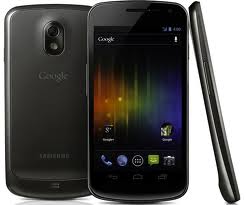
Samsung Galaxy Nexus GT-19250 comes with good cooperation between Samsung and Google. In the Galaxy Nexus GT-19250, Google has set up some excellent features to this smartphone. Samsung Galaxy Nexus GT-19250 uses screen AMOLED HD 4.65-inch with super processor dual-core 1.2 GHz Cortex-A9 powered graphics PowerVR SGX540, in addition to Samsung Galaxy Nexus GT-19250 is the first smartphone with Android Ice Cream Sandwich.
Specifications and features the following explanation of Samsung Galaxy Nexus GT-19250 :
With a 4.65-inch screen size, Samsung Galaxy Nexus GT19250 not put physical buttons like in general of phones. Galaxy Nexus has installed three virtual buttons that act as substitutes for physical buttons. These three virtual buttons are Back, Home, Recent Apps. Being for the Menu button, will pop up if needed. Thus, the front display of the Nexus GT-19250 almost looks clean without any physical buttons.
To turn on Galaxy Nexus GT 19250, you can press the power button on the right side, left hand side there are volume buttons. And at the bottom, you'll find the charger port.
To unlock a locked screen, slide the lock to the right side to unlock it, but if you shift to the left, your meal will go directly into the camera. Separately lock the screen Nexus GT-19250, you can use the 6 methods of locking the screen is None, Slide, Face Unlock, Pattern, PIN, and Password.
For the homescreen pages, you'll see the screen on the homescreen of blue combined with orange and black background, making the display of Samsung GT-19250 is elegance. While on display shortcuts and the widget on the homescreen pages can be altered to your liking. The trick, press and hold the applications and widgets for a while to move to the homescreen pages, and place theshortcuts and the widget you want.
On the menu page, you will see a menu similar with Android Honeycomb to but distinct categories and widgets apps. By using the Ice Cream Sandwish, menu display of Samsung Galaxy Nexus GT-19250 have interesting effects are like fade in fade out and transparent. Awezome!
As for the setting, the camera has three additional settings are scene modes, exposure and white balance contained in the left side of the viewfinder. In the lower left of the viewfinder, there is a button that switches the camera function for capturing still images, video, and panoramic (special feature).
To recording video, Samsung GT-19 250 Galaxy Nexus is able to produce images with FullHD1080p resolution at 24fps. Not only that, the ability of the front camera is also capable of recording video HD720p at 30fps, with the MP4 format.
Another with a video player, you must be a little disappointed with the look of a simple video player that only once and without the ability to display subtitle.
On a browser page, there are menu refresh, forward, bookmarks, settings and the option to save web pages in order to re-read while offline.
In the internal connections, Samsung Galaxy Nexus GR-19250 not put HDMI port that will make it less flexible in exploring mobile content via a PC.
samsung nexus
Specifications and features the following explanation of Samsung Galaxy Nexus GT-19250 :
Design
Design view of Galaxy Nexus GT-19250 is a full touchscreen candy bar with a plastic material that looks gorgeous on the back of the casing with a texture that is jagged. With the design curve glass, you will feel comfortable when making phone calls.With a 4.65-inch screen size, Samsung Galaxy Nexus GT19250 not put physical buttons like in general of phones. Galaxy Nexus has installed three virtual buttons that act as substitutes for physical buttons. These three virtual buttons are Back, Home, Recent Apps. Being for the Menu button, will pop up if needed. Thus, the front display of the Nexus GT-19250 almost looks clean without any physical buttons.
To turn on Galaxy Nexus GT 19250, you can press the power button on the right side, left hand side there are volume buttons. And at the bottom, you'll find the charger port.
Screen
By using the super AMOLED HD screen is also used by Samsung GT 19250 has increased at a screen resolution of achieving HD720p (1280x720). From the side of the screen display, screen of Samsung Galaxy Nexus GT-19250 has a fairly wide viewing angle and excellent color balance between contrast, brightness and sharpness. As for the touch screen, is very sensitive. However, the screen looks reflective to the intense light, like sunlight, thus reducing the display this smartphone.Interface & OS
With support from Google, Samsung Galaxy Nexus is using Android OS 4.0 Ice Cream Sandwich which comes with the default interface without customization.To unlock a locked screen, slide the lock to the right side to unlock it, but if you shift to the left, your meal will go directly into the camera. Separately lock the screen Nexus GT-19250, you can use the 6 methods of locking the screen is None, Slide, Face Unlock, Pattern, PIN, and Password.
For the homescreen pages, you'll see the screen on the homescreen of blue combined with orange and black background, making the display of Samsung GT-19250 is elegance. While on display shortcuts and the widget on the homescreen pages can be altered to your liking. The trick, press and hold the applications and widgets for a while to move to the homescreen pages, and place theshortcuts and the widget you want.
On the menu page, you will see a menu similar with Android Honeycomb to but distinct categories and widgets apps. By using the Ice Cream Sandwish, menu display of Samsung Galaxy Nexus GT-19250 have interesting effects are like fade in fade out and transparent. Awezome!
Hardware
By using a dual core processor 1.2 GHz, Nexus GT 19250 is able to work optimally, but unfortunately the use of less SGX540 PowerVR GPU support. But luckily, Galaxy Nexus was installed RAM capacity of 1GB and enough large file storage, 16GB. Moreover, the battery capacity is the maximum tolerable in watching a video, 6 hours of nonstop with 1750mAh Li-Ion battery.Camera And Video
Results from the camera and video of Samsung Galaxy Nexus GT-19250 is very good, both for the front camera or back camera (dual camera) for Nexus GT 19250 has installed a camera with 5MP resolution for the rear camera, while 1.3MP front camera. And of course, already available LED flash.As for the setting, the camera has three additional settings are scene modes, exposure and white balance contained in the left side of the viewfinder. In the lower left of the viewfinder, there is a button that switches the camera function for capturing still images, video, and panoramic (special feature).
To recording video, Samsung GT-19 250 Galaxy Nexus is able to produce images with FullHD1080p resolution at 24fps. Not only that, the ability of the front camera is also capable of recording video HD720p at 30fps, with the MP4 format.
Multimedia
In the music features, Samsung Galaxy Nexus GT-19250 has been found Google Music with categorize song by song, album, playlist, artist, genre and recent. The resulting sound was a bit slow but if you use a headset so the result is very good and steady.Another with a video player, you must be a little disappointed with the look of a simple video player that only once and without the ability to display subtitle.
Internet & Connectivity
By having a connection HSUPA 5.76Mbps and 3GHSDPA 21Mbps, internet connection of Samsung Galaxy Nexus GT-19250 is capable of doing well and also supports flash player. Especially with the native Android 4.0 browser that is able to open 16 web pages at once.On a browser page, there are menu refresh, forward, bookmarks, settings and the option to save web pages in order to re-read while offline.
In the internal connections, Samsung Galaxy Nexus GR-19250 not put HDMI port that will make it less flexible in exploring mobile content via a PC.
Features Samsung Galaxy Nexus GT-19250
- Barometer HD: With censor from Bosch, you can take measurements of pressure although there was no signal from the mobile operator or a GPS. To use this feature, you must download from Android Market.
- Movie Studio: Applications that can edit video.
- Office Viewer: Applications that can open Office files (Office 2003, Office 2007) and PDF.
- Google Earth: The application can display a 3D map.
- Compass: The application determines the direction anddoes not depend on the cellular or GPS sinya operator. Download the application from Android Market.
Features Android OS 4.0 Ice Cream Sandwich on Samsung Galaxy Nexus GT-19250
- Multitasking: With the recent virtual apps, you can move easily between aplications in progress.
- USB Host: Can read the contents of the flash disk. But first you have to use a converter cable for Samsung Nexus GT 19250 coz it has not installed the USB port. In addition, you also need to upgrade this system for be use USB Host.
- Face Unlock: lock using the face, the screen will open if your face is exposed to the camera, but it can also open by your photo.
- Photo Editor: As the name implies, you can edit on your photographs.
- Data Usage: Limiting Internet usage is to monitor and regulate the amount of maximum quota of internet.
General Specifications
- Display : 4.65-inch 1280X720 HD Super AMOLED
- Dimensions : 135.5 x 67.94 x from 8.94mm, 135g
- OS : Android 4.0 Ice Cream Sandwich
- CPU : 1.2 GHz Dual Core Processor
- Camera : 5MP with LEDFlash, 1.3MP front-facing
- Storage : 1GB(RAM) + 16GB/ 32GB Internal memory. No SD cardcapabilities
- Connectivity : Wi-Fi a/b/g/n, Bluetooth 3.0, USB 2.0, NFC,GPS
- Battery : Li-on 1,750 mAh

